
Room Difference: study the room before trusting your memory
Explore twenty-four small 3D interiors, then identify the objects that vanished, turned or changed size without rushing against a timer.
A familiar room becomes a question
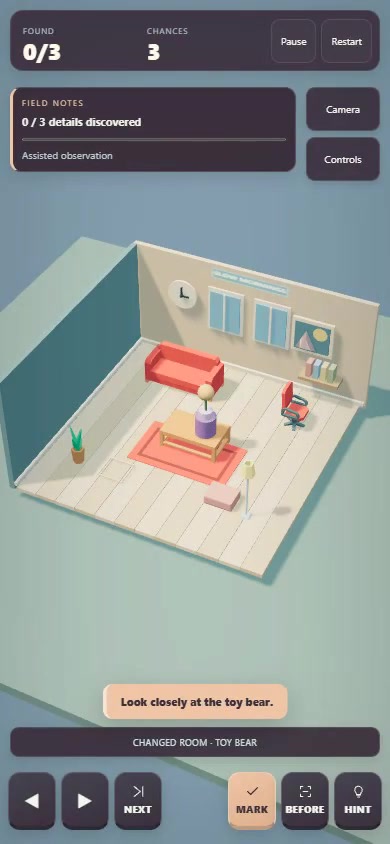
Room Difference starts with a furnished 3D interior and gives you time to look around. When you press READY, several details change. Your task is to identify every altered object before making three mistaken guesses. This is a sequential observation puzzle: you study the original, then compare the changed room with what you remember, rather than keeping two static pictures beside each other throughout the round.
The current game contains twenty-four rooms. Furniture and smaller decorations give you different kinds of details to notice: the main furnishing, a chair, a rug, a clock, books and other objects. Changes can remove an item, turn it or resize it. Early rooms ask for three discoveries, while later groups increase the number to four and then five. There is no timer, so careful inspection is part of the intended play procedure.
Look around before pressing READY
Use the left and right controls to turn the view, or use the camera option to change the angle. Before starting the search, take a deliberate pass through the room. Notice what sits on the floor, what rests on furniture and what hangs on the wall. A broad impression of the colour scheme is less useful than remembering a few specific relationships, such as the chair's orientation or the size of an ornament.
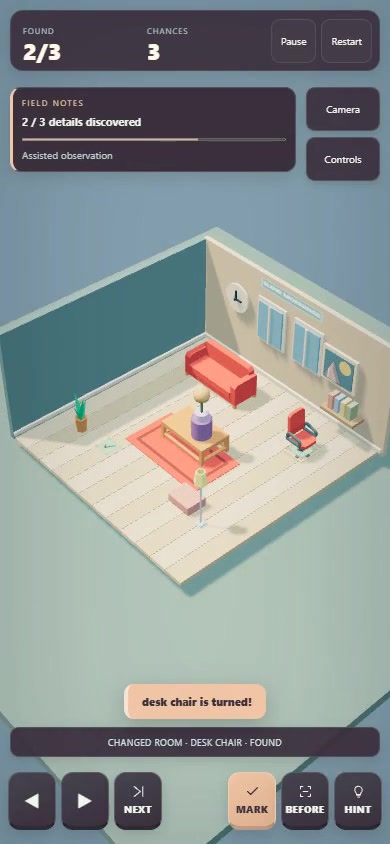
When you are ready, press READY or Space to switch to the changed scene. Tap an object you believe has changed. Alternatively, use NEXT or Tab to cycle through named objects, then MARK or Space to submit the selected one. Cycling is particularly useful when the thing you remember is missing: you can select its named place in the room instead of relying only on a visible object to tap.
A changed angle is not a changed object
Moving the camera helps reveal details, but it can also make an unchanged object look unfamiliar. Compare the same feature from a similar angle before using a guess. For a turned chair, look at the direction it faces; for a resized decoration, compare it with its surroundings. An absence, a rotation and a size change are different possibilities, so ask which one your observation actually supports.
Correct discoveries receive feedback and a marker. An object already found does not need to be marked again. Incorrect guesses use one of your three chances, and the third mistake ends the room. This gives uncertainty a cost without imposing a countdown. If a detail only feels vaguely unusual, inspect another angle or use the available assistance rather than repeatedly tapping objects at random.
BEFORE and HINT offer different kinds of help
BEFORE, or B, revisits the original room. RETURN takes you back to the changed version when you have compared the detail you needed. Using this reference counts as assistance and caps the room at two stars. It is useful when you know which feature you want to check but cannot confidently remember its original appearance.
HINT, or H, selects a remaining changed object and tells you where to look. It also counts as assistance. The hint identifies a subject for attention; observing what changed still helps you understand the scene. On a later attempt, try to study that type of detail before pressing READY. Treat assistance as information about what your first inspection missed, rather than merely a faster route through the room.
Perfect Recall makes a replay specific
Finding every change without assistance or mistaken guesses earns the optional Perfect Recall seal. The same conditions also allow a three-star finish. That gives a completed room another useful challenge: can you make your initial inspection precise enough that no reference check is needed? You do not have to race through it. A calm, organized scan can be more productive than trying to memorize the entire scene in one glance.
For a practical approach, divide attention into large furniture, floor objects and wall details. After READY, use the same order. This reduces the chance of repeatedly checking the most conspicuous item while overlooking a small one. The method is a playing suggestion based on the room layout, not a guarantee that every puzzle will become easy or a claim about improving memory outside the game.
Why noticing one small change feels good
Our design reading is that the pleasure comes from turning uncertainty into a specific observation. Familiar objects make the room easy to read, while subtle changes reward a second look. The absence of a timer leaves the tension in your confidence and remaining guesses. That is analysis of the implemented mechanics, not a documented statement of developer intent or a measured psychological result.
Play the verified Oppoz release through Where to play below. The gallery contains genuine official-preview frames; the cover is promotional artwork. Searches on CrazyGames, Playgama and Google Play did not verify this exact portfolio title there. Those external releases remain unverified, so only the confirmed playable destination is linked.
Inside the game